Happyload: A Playful Display Font for Digital Creativity
I was working on a new boutique website for a handmade candle brand when I first stumbled upon Happyload. The client wanted something warm, inviting, and just a little bit whimsical to match their product's natural, organic feel. After testing several display fonts, I found that Happyload stood out with its unique scratched characters and friendly charm. It didn’t just look good—it felt right.
A Font That Feels Like a Handwritten Note
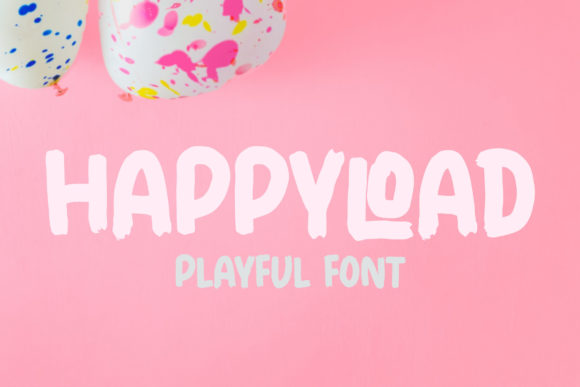
Happyload is a playful display font that brings a sense of joy and approachability to any digital design. Its characters are crafted with a slightly rough, scratched texture that gives them a handcrafted feel. This makes it perfect for websites that want to communicate a personal, artisanal vibe without sacrificing style or professionalism.
The font has a friendly and fun style that works well in hero sections, call-to-action buttons, and promotional banners. It’s especially effective when paired with clean sans serif fonts for body copy, creating a balanced visual hierarchy that guides the user’s eye naturally through the page.
Testing Happyload in Real Web Layouts
I tested Happyload across several different layouts, including a product landing page, a blog header, and a campaign landing page. On the product landing page, I used it for the headline “Hand-Poured with Care” over an image of a rustic wooden candle holder. The contrast between the textured font and the smooth background created a nice visual pop without overwhelming the design.
For the blog header, I placed Happyload in a subtle banner above a collection of articles about natural living. It added a touch of personality while keeping the overall tone professional. On mobile, the font remained legible even at smaller sizes, which was reassuring for responsive design considerations.
One thing I noticed was how well Happyload worked as a decorative accent. When used sparingly—like on a CTA button or a section heading—it added visual interest without distracting from the content. However, I avoided using it for long paragraphs or dense blocks of text, as its playful nature isn’t suited for extended reading.
Best Practices for Using Happyload Online
If you're considering using Happyload in your web design, here are a few tips to keep in mind:
- Use it for short phrases and headlines: Happyload shines in short bursts of text, such as hero titles, section headings, or taglines.
- Pair it with a clean body font: To maintain readability, pair Happyload with a simple sans serif or serif font for body copy.
- Consider accessibility: While Happyload adds character, ensure there's enough contrast against backgrounds and that it doesn’t compromise legibility for users with visual impairments.
- Check file formats and webfont availability: Before implementing Happyload on a live site, confirm that it supports webfont formats like WOFF and WOFF2 for optimal performance and loading speed.
When Happyload Might Not Be the Best Fit
Despite its charm, Happyload isn’t suitable for every digital use case. It’s not ideal for small navigation text, form labels, or long-form content where readability is key. Its decorative nature also means it may not work well on very dark or busy backgrounds where it could become hard to read.
Additionally, if you’re designing for an interface that requires high accessibility standards, such as a healthcare or financial website, a more straightforward font might be a better choice. But for creative brands, boutique sites, or lifestyle-focused projects, Happyload can be a powerful tool for expressing personality and brand identity.
Bringing Happyload Into Your Brand Identity
As a web designer, I’ve found that Happyload is a great asset for building a cohesive brand identity online. Whether you're launching a new course, redesigning a blog, or revamping an online store, this font can help set the tone and mood of your digital presence.
Its versatility allows it to blend into both modern and vintage-inspired designs, making it a valuable addition to any designer’s toolkit. Just remember to test it in various contexts and always consider how it interacts with other design elements before finalizing your layout.